Creating an efficient and comfortable desk setup is essential for maintaining focus and productivity throughout your workday. Whether you work from home or in an office, having a well-organized and ergonomic space can reduce distractions, prevent discomfort, and help you stay motivated. In this post, we’ll explore practical tips to design a desk setup that supports both focus and comfort.
Why a Good Desk Setup Matters
Your desk setup is more than just where you place your computer and paperwork. It influences your posture, your mental clarity, and your overall work experience. A cluttered or poorly arranged workspace can lead to distractions, physical strain, and fatigue. On the other hand, a thoughtfully arranged desk encourages efficient work habits and helps maintain your energy levels throughout the day.
Choosing the Right Desk and Chair
Invest in Ergonomics
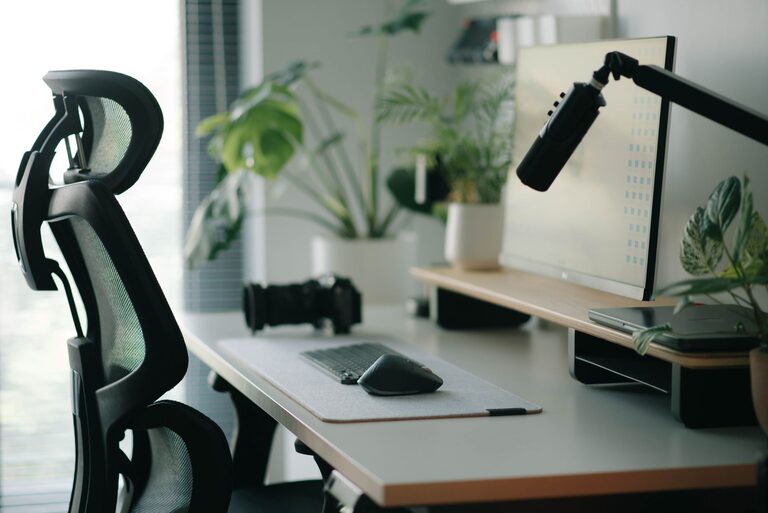
Ergonomics is the science of designing a workspace to fit your needs. Using an ergonomic chair and desk can prevent issues like back pain, neck strain, and repetitive stress injuries. Look for a chair with adjustable height, lumbar support, and comfortable cushioning. Your desk should be at a height where your elbows can rest comfortably at a 90-degree angle while typing.
Consider Desk Size and Shape
Your desk should be large enough to hold your essential items but not so big that you feel overwhelmed. A compact desk with enough surface area for your computer, keyboard, and a few accessories often works best. Corner desks or L-shaped desks can also maximize space in smaller rooms.
Monitor Placement and Screen Setup
Position Your Monitor at Eye Level
The top of your computer screen should be at or just below eye level. This helps keep your neck in a natural position and reduces strain. Consider using a monitor stand or adjustable arm to achieve the right height.
Maintain Proper Distance
Place your monitor about an arm’s length away from you—roughly 20-30 inches. This distance helps reduce eye strain and keeps your posture relaxed.
Use Multiple Monitors Wisely
If you use more than one screen, position them closely and at a similar height. This arrangement minimizes head turning and helps maintain focus across tasks.
Organizing Your Desk for Productivity
Keep Essentials Within Reach
Place frequently used items like pens, notebooks, and your phone close by. Avoid cluttering the workspace with items you rarely use.
Declutter Regularly
Clear off unnecessary papers, gadgets, and accessories at the end of each day. A clean desk can reduce distractions and prepare you mentally for the next day.
Use Organizers and Storage Solutions
Desk organizers, trays, and drawers help keep everything in its place. Label storage containers if needed to quickly find what you need without losing focus.
Lighting for Comfort and Alertness
Maximize Natural Light
Position your desk near a window to benefit from natural daylight, which can improve mood and alertness. Just be mindful of glare on your screen.
Add Task Lighting
A good desk lamp with adjustable brightness can reduce eye strain, especially in low light conditions. Choose bulbs that offer a balanced color temperature—neither too warm nor too cool.
Incorporate Personal Comfort Elements
Use a Comfortable Keyboard and Mouse
Ergonomic keyboards and mice reduce wrist strain. Consider options with wrist rests or those made for your hand size.
Bring in Supportive Accessories
A footrest can improve posture, and a wrist pad can add comfort when typing.
Add Personal Touches
Plants, photos, or motivational quotes can make your workspace inviting, which in turn supports focus and well-being.
Manage Noise and Distractions
Use Noise-Cancelling Headphones
If you work in a noisy environment, headphones can help you focus by blocking distractions.
Keep Electronics on Silent or Do Not Disturb
Limit interruptions by silencing unnecessary notifications on your phone and computer.
Take Breaks and Move
Even the best setup can’t replace the benefits of moving. Set reminders to stand, stretch, or walk around every hour. Movement helps reduce fatigue and keeps your mind sharp.
Final Thoughts
A desk setup that balances focus and comfort is achievable with thoughtful choices and small adjustments. By selecting the right furniture, organizing your space, managing lighting, and incorporating ergonomic accessories, you can create a workspace that supports productivity and well-being. Start implementing these tips today to enjoy a more comfortable, focused work experience.
About the Author